Archive of posts with the topic

By now, few can deny the benefits of responsive website design. The web follows us everywhere, and responsive websites help publishers connect with readers on a variety of devices.
But what constitutes quality responsive design? Adapting content width to screen size is one thing, but providing a seamless, consistent experience across platforms is quite another. With an eye toward how we design responsive WordPress themes at The Theme Foundry, let’s examine some primary building blocks of effective responsive websites.
Read more

Given WordPress’s status as the web’s most popular self-hosted blogging platform, it’s no surprise that the managed WordPress hosting business is booming.
For a monthly fee up to seven times the cost of shared hosting, many providers offer feature-rich hosting packages built especially for WordPress users. The question, of course, is whether extra features warrant the extra cost.
Here, we’ll discuss why you might opt for managed WordPress hosting. We’ll also look at some popular shared hosts, compare their plans to WordPress-centric alternatives, and help you determine which hosting arrangement best suits your needs.
Read more
If creating a custom WordPress sidebar sounds difficult, baffling, or all-out impossible, we’re here to destroy your apprehensions. There is a plugin called Widget Logic that gives you precise control over your WordPress sidebar widgets.
Widget Logic lets you display specific widgets on an individual page or group of pages. For example, if you want to display links to your social media profiles alongside individual posts but not on your “About” page, Widget Logic can make it happen. There’s a catch, though. Widget Logic requires you to add conditional tags to every widget – and adding conditional tags means learning a little PHP. If you don’t mind learning a little PHP, or already know how to edit code, keep reading.
If you don’t feel like learning PHP, or have no interest in code, take a look at our Make WordPress theme. Make features a powerful drag and drop page builder, and when you upgrade to Make Plus, you’ll also get on demand widget areas and per page sidebar controls. Once you start using Make with Make Plus, you’ll have all the precise sidebar control you could ever wish for.
Read more
A couple of weeks ago, to celebrate the release of Make, we held a contest. The only criteria was to show us a site that was created with Make. Our two winners, Kristyn Brady and Tracey Upchurch, did just that and we are happy to share their sites with you today!
As we were congratulating Kristyn and Tracey we took the opportunity to learn more about each of them and their life online. Here is what they had to say:
Read more
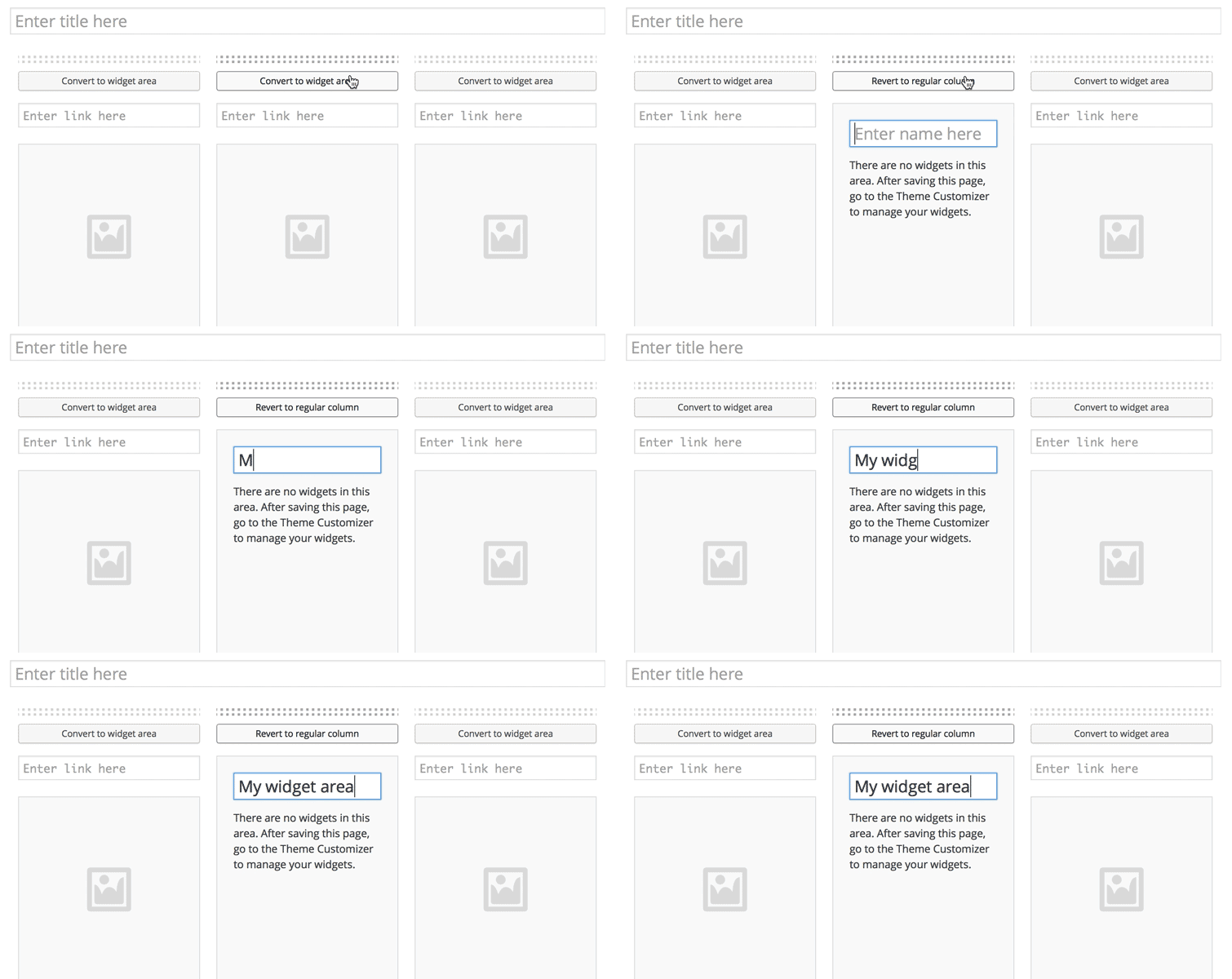
Our latest theme, Make, features a simple drag and drop page builder interface. It gives you the power to build a professional and responsive website by arranging sections and columns on your page.
We wanted to make the page builder even more flexible by adding support for widget areas in Make Plus. Widget areas unlock all kinds of interesting options. Popular plugins often add custom widgets to WordPress. These widgets can be placed almost anywhere on the page when you’re using the Widget areas that come with Make Plus. Some quick examples of what you can do with widget areas:
Read more

A faster website can help you attract readers, retain them, and improve SEO. And if you’re using WordPress, incorporating a few simple administrative practices – and changing some publishing habits – could be just what you need to speed up WordPress.
Let’s explore several ways small publishers can make WordPress faster. These tips are for coders and non-coders alike, so anybody can use them to improve website performance.
Read more

Many popular blogs use third-party commenting systems. From social sign in to support for rich media, comment management systems like Disqus and Livefyre bring an array of features to online conversations. Read through these brands’ marketing literature, and you might be convinced that native WordPress commenting is dull and outmoded by comparison.
Yet in spite of the impressive feature suites these two well–heeled organizations bring to the table, WordPress comments still have a lot to offer. In fact, the WordPress comment system provides at least one extremely useful feature for small publishers – a feature neither Disqus nor Livefyre can touch.
Let’s consider that feature and others as we explore the advantages of WordPress native comments and alternative comment applications alike. We’ll begin with the option many of us already know well: the built-in WordPress commenting system.
Read more
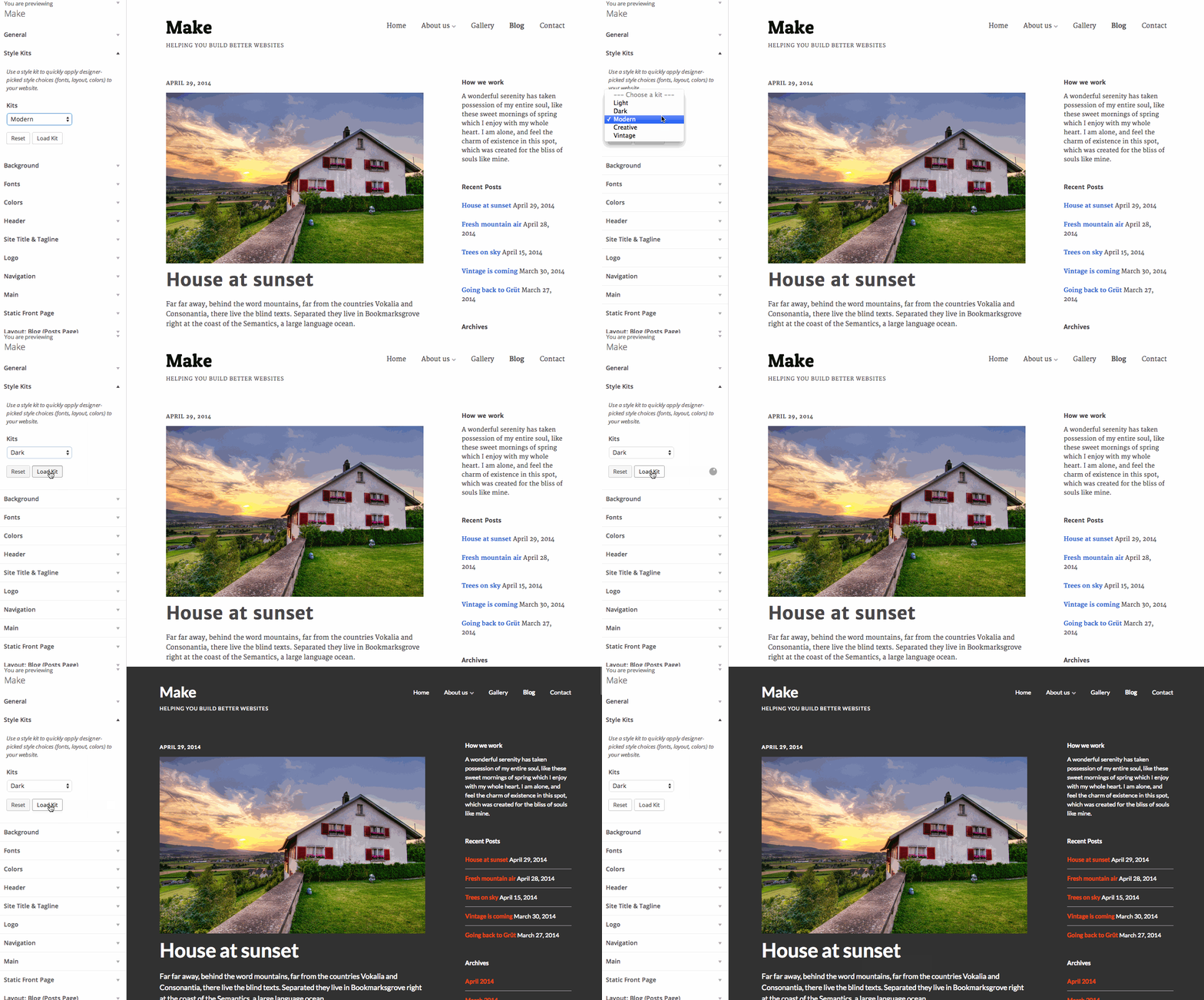
Earlier this week we released a new version of Make Plus, the powerful companion plugin for our new free drag and drop WordPress theme, Make.
One of the new Make Plus features is Style Kits. Think of them like custom starter themes for Make. Style Kits give you a head start with the design of your Make powered site. When you load a Style Kit, we’ll populate your Customizer design settings for your site with some hand picked style choices. You can then take control and tweak each the individual setting to get things just right.
Here’s the rundown on the rest of the new features we released:
Read more

Prior to April, 2014, modifying WordPress widgets posed a serious editorial challenge. To view any changes made to a widget, publishers had to click “Save,” navigate to a website’s front end, and examine the published modifications. Any mistakes would already be visible on the live website.
Thankfully, the release of WordPress 3.9, Smith, took care of this issue for good. By merging the popular Widget Customizer plugin into the WordPress Core, the latest update lets users enjoy live widget previews before publishing any changes.
Here, we’ll show you how to use this new feature and improve how you work with widgets. Never again will you publish widget content without previewing it first – and that’s a beautiful thing.
Read more

One of our most common customer requests is: “How do I set up my website like the demo website?”. The most obvious answer would be to just hand that customer an unwieldy dump of demo WordPress data to import into their website. A slightly better option would be to add a button to our theme that imports this same dump of data into their WordPress website automatically.
When building Make, we knew we wanted to solve this problem, but neither of these solutions felt like a very nice user experience. Dumping a bunch data into a WordPress site just feels sloppy. We really wanted to find a more intentional approach.
Read more