Identifying the perfect WordPress theme for your business website requires time, tenacity, and – this one might surprise you – restraint.
While there’s a seemingly endless array of gorgeous WordPress themes at your disposal, choosing one isn’t a decision you should base solely on aesthetics. A business website, after all, doesn’t exist just to look nice; it’s a tool that should help you generate revenue.
Read more
If you’ve ever switched WordPress themes, you know how frustrating it can be to tweak your site to perfection while it’s live. The whole world can view your changes in real time, not to mention your mistakes. It’s far from ideal, sure, but what choice do you have?
Read more
Earlier this year, we published a post about how to find the best WordPress themes, whether free or premium. That post speaks to some of the issues you’re likely to encounter as you scour the Web for themes. It provides guidance on subjects like:
- where to search for free themes and how to identify the highest quality (and most secure) choices among them
- the difference between theme marketplaces and independent theme shops
- how to gauge the quality of a WordPress theme provider
However, one thing we don’t cover in that post is why you might prefer a readymade free or premium theme to a custom WordPress design, or vice versa. There’s the obvious response to that question – that everyone would prefer a custom theme if they could afford it – but we think the initial cost difference isn’t the only issue. There’s so much more to the story!
Whether to invest in custom design is a question many bloggers, freelancers, and small businesses using WordPress wrestle with. Let’s look beyond upfront cost and consider all of the factors that should influence this important decision.
Read more
All themes from The Theme Foundry come translation-ready. Instead of making you create a file containing the human-readable text from a particular theme, we’ve included that file with the theme itself. All that’s left is performing the actual translation, which is where you (or a professional translator) come(s) in.
Why translate a WordPress theme? For starters, around 44% of WordPress websites are written in a language other than English. People all around the world use WordPress!
Translating a theme can also help you “localize” it for a specific lexicon. For example, our friends in the UK might “get ‘round to” a task while Americans simply “get to” it. Localization can help you tailor a theme to the vernacular of a specific country or region, if you so desire.
Tip: Use a virtual private network to research common terms that appear on search engine results pages in other countries.
We’re about to show you how to translate our themes. But first, let’s examine the three types of files involved in the translation process: .pot, .po, and .mo.
Read more
As part of ongoing efforts to improve our Make theme for WordPress, we’re proud to announce several new enhancements. All of the following updates are available in the latest versions of Make and Make Plus. Download Make for free to see the biggest, most sweeping changes in action!
Read more
About, About Me, About Us, Who We Are, Our Story, Meet the Team… the humble About page comes in many different flavors. Despite being stylistically different, all serve the same fundamental purpose of telling your audience about you – in other words, showing them what you’re about.
So, does your website need an About page? We think most bloggers, special interest organizations, and small to midsize businesses using WordPress should publish an About page in some shape or form; the reasons are twofold:
- Authenticity and trust: There’s a reason why About pages are among the most visited pages on many websites. Your audience wants to confirm that you’re genuine and, if you’re selling something, that you’re someone with whom they want to do business.
- Brand awareness: What better way to call attention to brand attributes than with a page that celebrates them? The About page is your opportunity to showcase your (or your organization’s) identity.
Let’s run through a few crucial steps that will help you create an About page that’s useful to to your audience and bolsters your brand. Not every About page is the same because no two publishers have the same goals. To know what kind of content should appear on your About page, you have to know what you’re trying to achieve. Which brings us to Step One…
Read more
If you’re staring at a white screen wondering where your WordPress website went, you’re not alone. Nearly every avid WordPress user has experienced the fabled “white screen of death” at one time or another. It’s a pain when it happens, but it’s usually easy to fix.
We’re about to explore several common causes of the white screen of death – from plugins to PHP and beyond. If you need to get rid of a white screen and recover your website right now, you’ll learn how. And if you’ve tangled with the white screen of death previously, don’t click away yet! We’re going to discuss various white screen scenarios, some of which you may not have encountered.
Read more
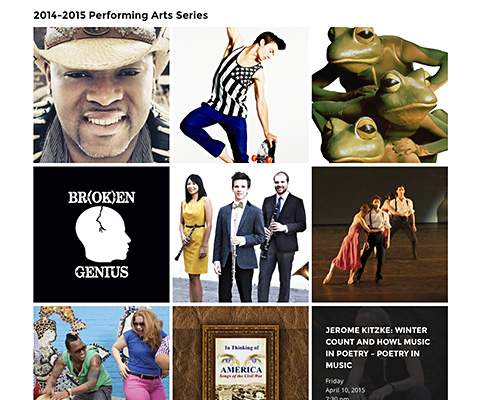
What kinds of websites can you create with our Make WordPress theme? We developed Make to provide versatile design and layout options for a variety of personal and professional sites, and we’ve been reaching out to users to find out how they’re taking advantage of the theme’s powerful features.
One organization doing exciting things with Make is the South Milwaukee Performing Arts Center (SMPAC), which hosts over 500 events each year at its 786-seat theatre. For SMPAC, using the web to connect with the public is crucial – and Make is helping it forge those connections.
Read more
Last week, WordPress 4.0, “Benny,” became available for download or automatic update in your WordPress Dashboard. Enhancements include improved media management tools, easier video embeds, and a more immersive editor – all in all, it’s an extremely rich update with lots of new features.
However, we think there’s one exciting aspect of 4.0 that many observers have underemphasized: a collection of changes to the Customizer.
While the Customizer received a number of improvements, the change most users will notice is the new panels interface, which makes it easier to view comprehensive, contextually-appropriate theme options right from the Customizer.
We like this change a lot. In fact, we’ve taken full advantage of it with the latest version of Make, our drag-and-drop theme featuring custom layouts.
Read more

Have you ever wondered why an image looked better before you published it? If you’ve had this experience, managing image quality in WordPress can seem like a frustrating, if not bewildering, endeavor. What’s happening to your images between leaving your hard drive and appearing on the web – and how do they get so blurry?
Read more